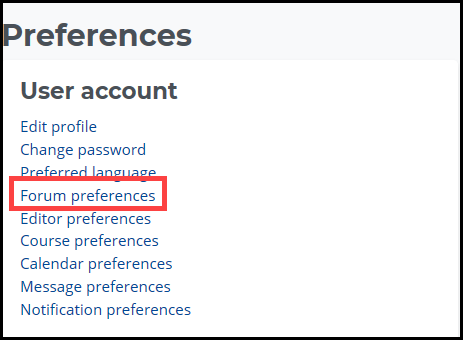
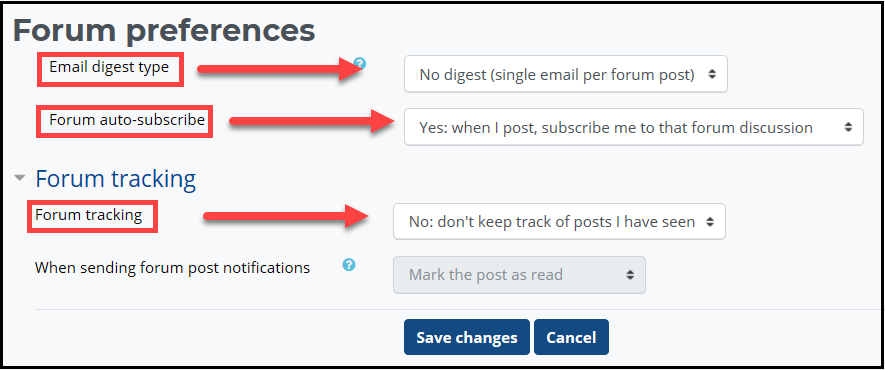
- Email digest type: Determines how much mail you receive in Outlook from discussion forums.
- No digest: The default option, "No digest," will cause Moodle to send you forum posts one at a time. So, shortly after someone posts to the forum in the course, you will receive a copy via email.
- Complete digest: The "Complete digest" option sends you just one email each day. This single email contains all of the forum posts from all of the forums to which you've subscribed. These daily digests are a great way to see all of the forum activity for a day at a glance.
- Subjects digest: The final option, "Subjects digest," is similar to the Complete digest option in that it also sends just one email per day. However, this email only contains the subject lines from the forum postings.
- Forum auto-subscribe: This setting determines what happens when you post to a forum.
- Yes: when I post, subscribe to that forum: With this option, you will be automatically subscribed to any discussion forum in which you post and will start receiving forum posts via email.
- No: don't automatically subscribe me to forums: This option will save your email from being inadvertently flooded with forum messages. You will still have the option to subscribe to forums on a case by case basis.
- Forum tracking: This setting allows for a highlighted number indicating the number of unread posts in a particular forum.
- Yes: Highlight new posts for me: With this setting, the number of unread posts is displayed next to the name of each forum and highlighted
- No: Don't keep track of posts I have seen: You would need to visit each forum to identify the new posts
|